


By Adil Ahmad | Updated: Feb 2026 |
How to Check Emirates ID Status — Quick Steps (2026)
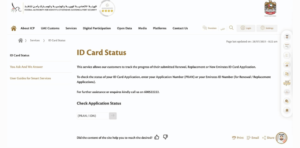
- Go to the ICP Smart Services portal — the official website of the Federal Authority for Identity, Citizenship, Customs and Port Security
- Enter your Emirates ID number or application number in the status field
- Click “Check Status”
- Your current application status appears immediately on screen
That is the fastest method. Full details, all methods, and status message explanations are below.
Emirates ID Status Check – Quick Reference (2026)
| Detail | Information |
|---|---|
| Official Authority | ICP – Federal Authority for Identity, Citizenship, Customs and Port Security |
| Status Check Portal | icp.gov.ae |
| Mobile App | ICP Smart Services App (iOS and Android) |
| SMS Method | Text Emirates ID number to ICP SMS service |
| Result Speed | Instant online / seconds via SMS |
| Certificate Validity | Matches your UAE residence visa duration |
What is the ICP, and why does it matter for Emirates ID
The authority responsible for Emirates ID in the UAE is the ICP, Federal Authority for Identity, Citizenship, Customs and Port Security, accessible at icp.gov.ae. It was previously known as the ICA (Identity and Citizenship Authority), but that name is no longer in use. Any reference to “ICA” in older guides refers to the same authority now operating as ICP.
Your Emirates ID is your primary legal identity document in the UAE. It is required for opening bank accounts, accessing healthcare, registering utilities, renewing your residence visa, travelling within the GCC, and completing almost every government and private service transaction. Keeping track of your Emirates ID status — whether you have applied for a new card, a renewal, or a replacement — prevents disruptions to all these services.
Method 1 — Check Emirates ID Status on the ICP Website
The ICP Smart Services portal is the primary and most reliable way to check the status of your Emirates ID application online.
Visit icp.gov.ae and navigate to Identity Card Services. Select “Identity Card Status” from the service menu. Enter your Emirates ID number (the 15-digit number on your card) or your application reference number if you are tracking a new application. Click the check button to display your current status immediately.
This method works for all status types — new applications, renewals, replacements, and cards under reprint. No login is required for a basic status check. The portal is available 24 hours a day and works on both desktop and mobile browsers.
Method 2 — Check Emirates ID Status Using the ICP Smart Services App
The ICP Smart Services mobile application is available on both iOS and Android. It is the most convenient way to check your Emirates ID status, track your application, and manage renewals on the go.
Download the ICP Smart Services App from the App Store or Google Play. Log in using your Emirates ID number or UAE Pass — the official UAE digital identity platform. Once logged in, navigate to “ID Card Services” and select “ID Card Status.” Your status, application stage, and any pending actions will be displayed clearly.
The app also sends push notifications when your card status changes, so you do not need to repeatedly check.
Method 3 — Check Emirates ID Status by SMS
For a quick status update without opening a browser or app, the SMS method is the fastest option.
Send your 15-digit Emirates ID number as a text message to the ICP SMS service number. You will receive a confirmation of your current card status within seconds. This method is useful when you do not have internet access or want a quick confirmation on the go.
Confirm the current ICP SMS number through the ICP official website, as service numbers are updated periodically.
Method 4 — Check Emirates ID Status with Your Passport Number
If you do not have your Emirates ID number available — for example, if you are a new applicant who has not yet received a card — you can check your Emirates ID status using your passport number.
On the ICP portal at icp.gov.ae, select the option to search by passport number instead of Emirates ID number. Enter your passport number along with your date of birth as prompted. This method is commonly used by first-time applicants and expatriates tracking a new card after completing their visa entry.
This is also the method to use for checking Emirates ID validity online — confirming whether your current card is active, expired, or within its validity window.
Method 5 — Visit a Customer Happiness Centre
If your status is unclear, you’re stuck on a particular stage, or you’re seeing an error online, visit any ICP Customer Happiness Centre in person. Staff will check your application in the ICP system directly and advise on any pending steps, such as biometrics, document submission, or fee payment.
Customer Happiness Centres are located across all emirates. No appointment is required for basic status inquiries, though appointments are recommended for full applications and renewals to avoid waiting time.
Emirates ID Status Messages — What Each One Means
When you check your Emirates ID status, you will see one of these standard messages. Here is what each one means and what action you need to take:
- Application Received — Your request has been submitted and accepted into the ICP system. No action needed. Wait for the next stage.
- Under Process — ICP is reviewing your application and documents. No action needed. This stage typically takes a few business days.
- Biometrics Required — You must visit an ICP Customer Happiness Centre or an approved typing centre to complete fingerprint capture and photograph. This step is mandatory and must be completed before your card can be issued.
- Approved for Printing — Your Emirates ID has been approved and is being printed. No action needed. Delivery follows shortly.
- In Transit — Your card has been dispatched and is on its way to the delivery point — either Emirates Post or your registered address.
- Ready for Collection — Your card is at the designated post office or collection point. Collect it with your passport or application reference number within the stated collection window to avoid it being returned.
- Delivered — The card has been delivered. If you have not received it, contact Emirates Post with your tracking number.
- Expired — Your Emirates ID is no longer valid. You must begin a renewal application immediately to avoid fines and service disruptions.
- Cancelled — The card has been cancelled in the ICP system, typically due to visa cancellation or departure from the UAE.
How to Check Emirates ID Renewal Status
If you have submitted a renewal application and want to track its status, the process is identical to checking a new application’s status.
Go to icp.gov.ae and use your current Emirates ID number or your renewal application reference number in the Identity Card Status section. The status will show whether your renewal is in process, approved for printing, or in transit. Renewal tracking is also available through the ICP Smart Services App under ID Card Services.
Start your renewal 30 to 60 days before your current card expires. Renewals submitted less than 30 days before expiry risk leaving you without a valid ID, which affects bank transactions, healthcare access, and government service eligibility.
Emirates ID Validity: How Long Is It Valid?
The validity of your Emirates ID depends on your residency category:
- UAE Nationals (5-year card): AED 100
- UAE Nationals (10-year card): AED 200
- Expatriates: Emirates ID validity matches your residence visa — 1, 2, or 3 years.
- Children under 15: Typically issued for 2-year validity
Your Emirates ID expiry date is printed on the front of the card and is also visible when you check your Emirates ID validity online through the ICP portal. Expatriates whose residence visa expires automatically require a new Emirates ID as part of the visa renewal process.
Emirates ID Application Fees (2026)
| Card Type | Fee (AED) |
|---|---|
| UAE National — 5 Years | 100 |
| UAE National — 10 Years | 200 |
| Expatriate — 1 Year | 100 |
| Expatriate — 2 Years | 150 |
| Expatriate — 3 Years | 200 |
| Application Processing Fee | 70 |
| Service Fee | 30 |
| Home Delivery | 40 |
| Replacement (Lost or Damaged) | 100 |
| Late Renewal Fine | 20 per month (after expiry) |
Fees can change. Confirm current fees at icp.gov.ae before submitting your application.
What to Do If Your Emirates ID Status Is Not Updating
If your status has not changed within 48 to 72 hours after completing all steps, take the following actions in order.
First, confirm your application reference number is correct and re-enter it manually rather than copying and pasting to avoid invisible character errors. Second, check whether biometrics are pending — if you have not visited an ICP centre for fingerprinting, your application will be held at that stage indefinitely. Third, contact ICP support directly through the ICP website contact form or call the ICP helpline. Fourth, if online channels do not resolve the issue within 5 working days, visit a Customer Happiness Centre in person with your passport and application reference number for direct resolution.
What Happens If Your Emirates ID Expires
An expired Emirates ID creates immediate practical problems. Banks may freeze transactions, healthcare providers may delay services, and some government portals will not allow login until your ID is renewed. Late renewal fines are charged by ICP at AED 20 per month after the expiry date.
Renew immediately if your card has expired. Visit icp.gov.ae or use the ICP Smart Services App to submit a renewal application. If your residence visa has also expired, your visa renewal must be processed first — your new Emirates ID will be issued to match the validity period of your new visa.
FAQ
How do I check my Emirates ID status online?
Go to icp.gov.ae, select Identity Card Services, enter your Emirates ID number or application reference number, and click Check Status. Results are instant.
How do I check the Emirates ID status with a passport number?
On the ICP portal, select the option to search by passport number. Enter your passport number and date of birth. This is the standard method for new applicants who have not yet received a card.
How do I check Emirates ID validity online?
Log in to icp.gov.ae or the ICP Smart Services App with your Emirates ID number. Your card validity dates and current active status are displayed under the Profile or ID Card Status section of your profile.
What does “Biometrics Required” status mean?
You must visit an ICP Customer Happiness Centre or an approved typing centre to complete fingerprint capture and photo registration. Your card cannot be printed until biometrics are submitted.
How do I track my Emirates ID renewal?
Use your renewal application reference number on the ICP portal under Identity Card Status, or track it through the ICP Smart Services App.
How long does it take to receive an Emirates ID?
After biometrics are completed and the card is approved for printing, delivery typically takes 5 to 7 working days via Emirates Post.
What is the ICP Smart Services App?
It is the official mobile application of the Federal Authority for Identity, Citizenship, Customs and Port Security (ICP) for tracking Emirates ID status, renewing cards, and managing identity services. Available on iOS and Android.
Can I check the Emirates ID status using UAE Pass?
Yes. Log in to the ICP Smart Services App using your UAE Pass credentials to access your ID status and manage all related services.
What should I do if I lose my Emirates ID?
Report the loss through icp.gov.ae or the ICP app, file a police report, and apply for a replacement card. The replacement fee is AED 100.
How often should I check the status of my Emirates ID?
Check it once after submission, once at the biometrics stage, and once when you receive the dispatch notification. The ICP app sends automatic status update notifications if you enable them.
Manage Your UAE Documentation with Incorpyfy
Checking your Emirates ID status is quick when you use the right portal and the correct authority name — ICP, not ICA. The Federal Authority for Identity, Citizenship, Customs and Port Security manages all Emirates ID services through icp.gov.ae and the ICP Smart Services App.
Incorpyfy supports individuals, employees, and business owners across the UAE with documentation, visa processing, and business setup services. Whether you need help with Emirates ID renewal tracking, guidance on new ID applications, residence visa processing, investor visa applications in the UAE, or end-to-end company formation and residency coordination in Dubai, our team provides clear, practical support at every step.
Need help with UAE visa or residency documentation? Contact Incorpyfy for a step-by-step plan.
- +971 52 650 6950
- 1006, First Floor, AL Nasr Central, 10th Street, Oud Metha, Dubai, UAE.
- info@incorpyfy.com
About the Author
Adil Ahmad is a UAE documentation and business setup specialist at Incorpyfy with extensive experience guiding expatriates, employees, and investors through identity, visa, and residency processes across the UAE. His expertise covers Emirates ID status check procedures, Emirates ID validity check online guidance, Emirates ID status check with passport number, ICP Smart Services portal navigation, UAE Pass integration for identity services, Emirates ID renewal tracking, Emirates ID application status monitoring, EID status check processes, ID card status checking via ICP, ICP Smart Service application workflows, Emirates ID card status tracking, new Emirates ID status updates, Emirates ID renewal status processes, track Emirates ID application guidance, UID card and EID application status management, GDRFA residence visa coordination, Emirates ID replacement for lost or damaged cards, late renewal fine avoidance, Customer Happiness Centre appointment guidance, and UAE resident card compliance for business owners and investors.